

Mastering the controls is one of the most important things when starting out in virtually every action RPG Roblox experience. The same rule applies to Archived as well, since its combat system has many nuances. With that in mind, we prepared the following Roblox Archived controls guide to help you get started.
Table of Contents
Archived Keyboard Controls Layout
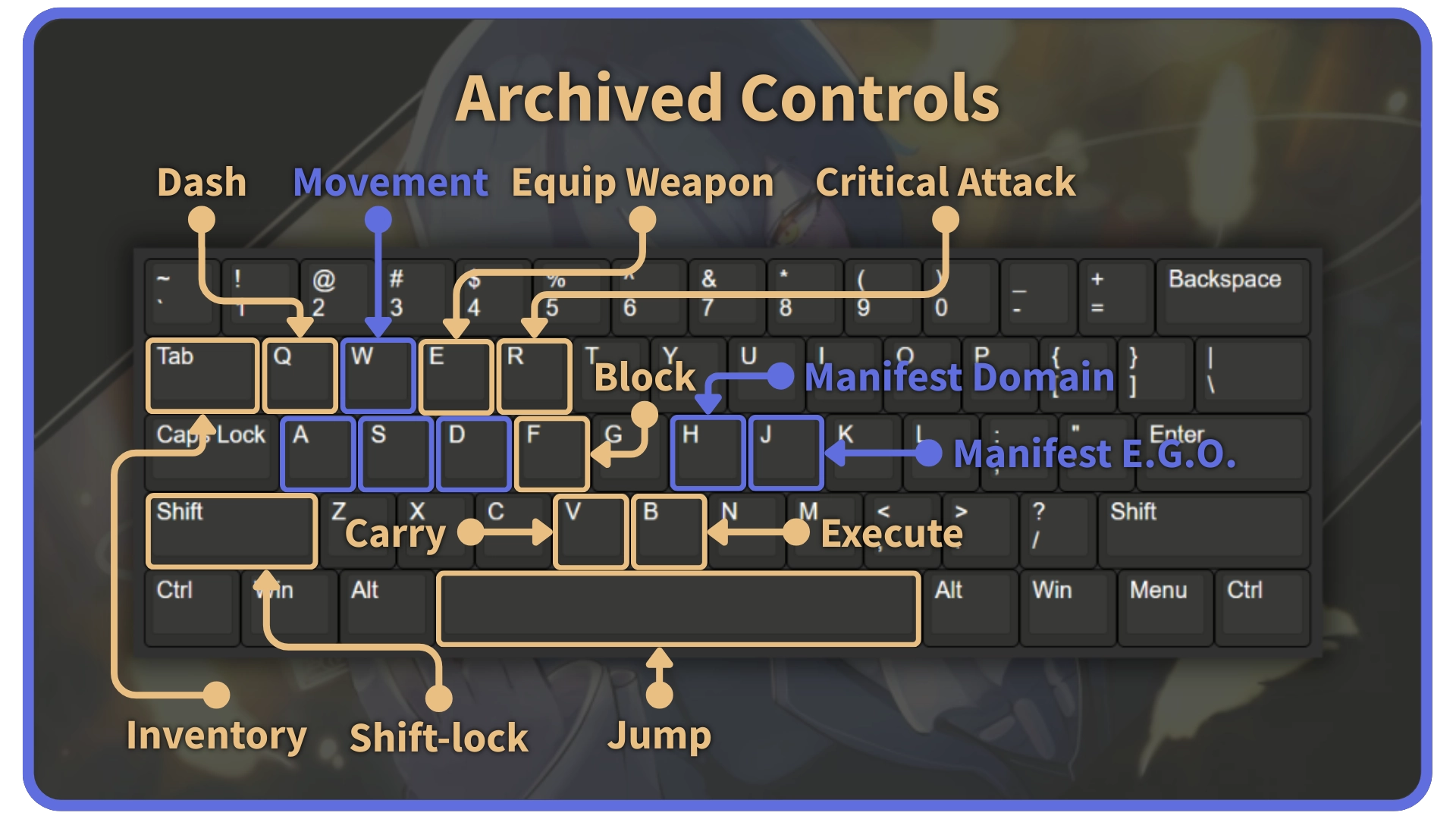
Archived controls layout on the mouse and keyboard is pretty standard, with a few special moves you can execute by pressing keys at the same time. Critical attacks differ from weapon to weapon, and they all have unique animations. Here is a complete list of moves and their keybinds on the mouse and keyboard:
| Control | Keybind |
|---|---|
| Movement | W A S D |
| Sprint | W (Double Tap) |
| Jump/Ragdoll Cancel | Space |
| Dash | Q |
| Equip/Unequip Weapon | E |
| Attack | LMB |
| Critical Attack | R |
| Charged Attack | LCtrl + LMB |
| Slide Attack | W (Double Tap) + Space + LMB |
| Block | F |
| Parry | RMB |
| Aim | LCtrl + RMB |
| Shin Generation | LCtrl + G |
| Manifest Domain | H |
| Manifest E.G.O. | J |
| Manifest E.G.O. Weapon | Y + J |
| Carry/Skip Dialogue | V |
| Grip/Execute | B |
| Inventory/Character Info | TAB |
| UI Rescale | RCtrl |
Rebinding Keys in Archived
Unlike in most similar RPG titles, rebinding keys in Archived is done through the in-game chat. The command that you have to use is !bind. To reset a keybind to its default value, use the !reset command. Here are the arguments that you can use along with these commands and examples of their correct usage:
| Command | Example |
|---|---|
| !bind [ControlName] [NewKeybind] [Overwrite (true or false)] | !bind ManifestEGO x !bind Parry f true (F becomes Parry) |
| !reset [ControlName] | !reset ManifestEgo |
List of Default Keyboard Keybinds
| Control Name | Default Keybind | Bind Command |
|---|---|---|
| LightAttack | LMB | !bind LightAttack |
| Critical | R | !bind Critical |
| Dodge | Q | !bind Dodge |
| Block | F | !bind Block |
| Parry | RMB | !bind Parry |
| Execute | B | !bind Execute |
| Carry | V | !bind Carry |
| SkipDialogue | V | !bind SkipDialogue |
| EmotionLevel | H | !bind EmotionLevel |
| ManifestDomain | H | !bind ManifestDomain |
| ManifestEGO | J | !bind ManifestEGO |
| Slot1 | 1 | !bind Slot1 |
| Slot2 | 2 | !bind Slot2 |
| Slot3 | 3 | !bind Slot3 |
| Slot4 | 4 | !bind Slot4 |
| Slot5 | 5 | !bind Slot5 |
| Slot6 | 6 | !bind Slot6 |
| Slot7 | 7 | !bind Slot7 |
| Slot8 | 8 | !bind Slot8 |
| Slot9 | 9 | !bind Slot9 |
| Slot10 | 0 | !bind Slot10 |
| Slot11 | T | !bind Slot11 |
| Slot12 | Y | !bind Slot12 |
| Slot13 | ` | !bind Slot13 |
| Slot14 | Z | !bind Slot14 |
| Slot15 | X | !bind Slot15 |
| Slot16 | C | !bind Slot16 |
That concludes our Archived controls guide. If you want to maximize the power of your build, then make sure to check out our Archived trait tier list as well. Good luck with creating a vast library of your own!
Archived Controls FAQs
Unfortunately, you can’t play Archived with a controller. However, you can use a compatible mouse and keyboard to play the game on the console.
Yes, you can bind multiple moves to the same key by leaving out the true/false parameter when using the !bind command.
You can rearrange your skills by pressing the ` key.


