MLB The Show 25 has a robust set of controls for all users, which varies based on what you’re currently doing (hitting, fielding, etc.), and you’ll want to master them all to win as many games as possible.
Recommended Videos
If you’re completely new to the series, this guide will be immensely helpful. While the default controls are for the PS5, you can use the same buttons on an Xbox controller.
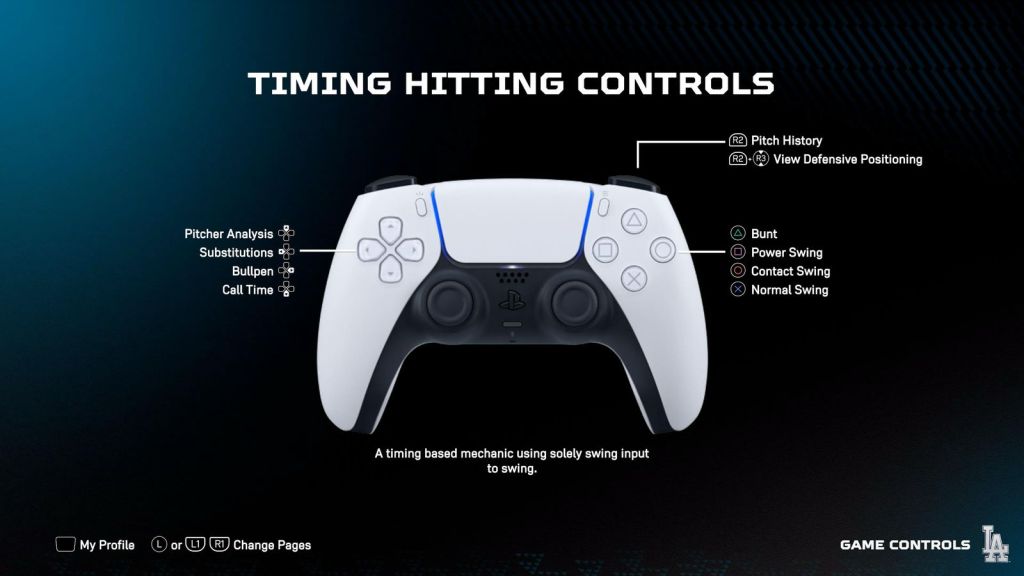
MLB The Show 25 Timing Hitting controls
Image via Destructoid
Action
Control
Pitch History
R2
View Defensive Positioning
R2+R3
Bunt
Triangle
Power Swing
Square
Contact Swing
Circle
Normal Swing
Normal Swing
Pitcher Analysis
D-pad up
Substitutions
D-pad left
Bullpen
D-pad right
Call Time
D-pad down
MLB The Show 25 Pitching controls (Classic)
Action
Controls
Pitch History
R2
View Defensive Positioning
R2+R3
Pitch Type 5 (R1)
R1
Pitch Type 3
Triangle
Pitch Type 4
Square
Pitch Type 2
Circle
Pitch Type 1
X
Deliver Pitch (After pitch select)
X
Pitch Out
L1+X
Intentional Walk
L1+Circle
Pickoff/Deceptive Move (Hold)
L2+Circle,Triangle,Square
Step Off (After Pitch)
L1
Batter Analysis
D-pad up
Substitutions
D-pad left
Bullpen
D-pad right
Set Shift
D-pad down
Locate Pitch (After Pitch)
LS
MLB The Show 25 Baserunning controls
Action
Controls
Reduce Lead
R1
Freeze Runner (In Play)
R2
Return All (In Play)
R1
Send 2B (In Play)
Triangle
Send 3B (In Play)
Square
Send 1B (In Play)
Cricle
Send Home (In Play)
X
Advance All (In Play)
L1
Select Individual Runner (In Play)
LS
Cue Steal/Steal Early (Hold) (Pre Pitch)
L2
Increase Lead (Pre Pitch)
L1
Select Individual Runner (Hold) (Pre Pitch)
LS
Head First Slide (Near Base)
RS up
Hook Slide Left (Near Base)
RS left
Hook Slide Right (Near Base)
RS right
Feet First Slide (Near Base)
RS down
MLB The Show 25 Fielding and Button throwing controls
Action
Controls
Dive
R2
Jump
R1
Throw 2B
Triangle
Throw 3B
Square
Throw 1B
Circle
Throw Home
X
Jump (In Play)
RS up
Dive (In Play)
RS down
Throw to Relay/Cutoff
L1
Move Player
LS
If you’re playing MLB The Show 25 on Xbox, here’s how the buttons compare to PlayStation. While the game is available on Xbox consoles, Game Pass subscribers are missing out on a big benefit compared to the last few years.
Destructoid is supported by our audience. When you purchase through links on our site, we may earn a small affiliate commission. Learn more about our Affiliate Policy.
Like our content? Set Destructoid as a Preferred Source on Google in just one step to ensure you see us more frequently in your Google searches!